Fraud can significantly impact revenue and customer trust when selling parts online. SimplePart provides tools in the Control Panel to help detect and prevent fraudulent orders, but your team needs to know how to use them effectively.
Recognizing potential fraud
There are a few common red flags for potential fraud you can look out for:
-
High-value orders
Orders that are much larger than typical purchases from your store can be a warning sign. For example, if a customer usually buys one or two small parts but suddenly places a large order of expensive items, it may warrant extra verification
💡Tip: Compare the order to the customer’s previous order history, if available.
-
Unusual shipping addresses
Be cautious if the shipping address is in a different city or country than the billing address, especially if it hasn’t been used before
Watch for P.O. boxes, freight forwarding addresses, or addresses associated with previous chargebacks or fraud
-
Multiple accounts from the same customer
Some customers may try to create multiple accounts using slightly different names or emails to take advantage of promotions or bypass restrictions
Check for duplicate billing addresses, phone numbers, or email patterns
-
Customer behavior patterns that may indicate risk
Rush orders or requests for expedited shipping without a clear reason
Frequent changes to order details after placing it
Use of multiple payment methods in a short period
Inconsistent or suspicious communication, such as evasive answers or requests for unusual delivery instructions
💡Tips:
Always cross-check billing and shipping information.
If something feels off, pause the order and verify with the customer.
Use the Control Panel tools to flag suspicious orders for review
Control Panel tools for fraud prevention
While our systems monitor suspicious activity, there are steps you can take to identify and prevent fraudulent orders.
1. Check your payment gateway settings
It’s critical to ensure your fraud prevention tools are active and properly configured:
PayPal / PayPal Payflow Pro: Verify that your fraud management filters and Address Verification Services (AVS) are enabled.
Authorize.Net: Confirm AVS and fraud settings are active according to recommended best practices.
Helpful links for configuration:
Recommended settings:
Recommended Authorize.Net AVS settings: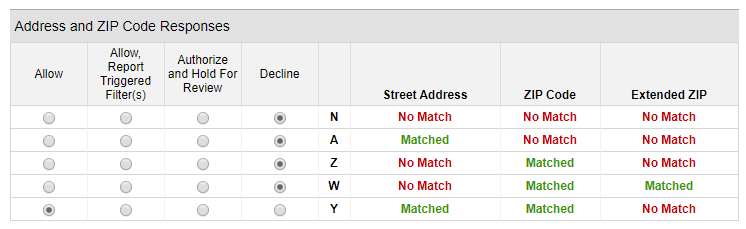
Recommended PayPal Payflow AVS settings:
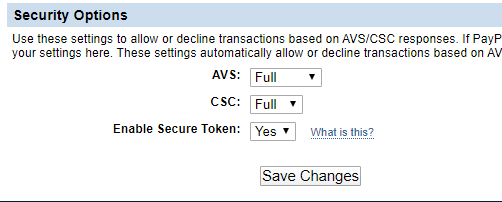
❗Important: You are not obligated to fulfill every order. If an order seems suspicious, pause fulfillment. Mark orders as fraudulent in the Control Panel to protect your business from repeat offenders.
2. Recognize red flags in orders
Watch for warning signs that may indicate potential fraud, as listed above.
3. Review order alerts in the Control Panel
The Recent Orders screen provides visual cues to help identify suspicious orders:
A or B / Green: Order ready to process; no alerts or fraud warnings
C / Yellow: Be wary; action required
F / Red: Take immediate action; potentially fraudulent
Check for fraud-related order warnings, such as:
Previous fraudulent orders
Address verification failures (AVS failures)
Billing and shipping address mismatches
4. Address Verification Service (AVS)
AVS compares the billing address provided by the customer with the information on file at the cardholder’s bank.
Failed AVS warning: Indicates a mismatch and may suggest a stolen card
Adjust your AVS settings via your payment gateway to block or flag high-risk orders
Monitor AVS failures; repeated failures may indicate increased fraud attempts
5. Verify customer information
When reviewing an order:
Check billing and shipping addresses: Ensure the address is real and matches; mismatches should trigger a confirmation call or email.
Check the email address: Confirm it appears legitimate and aligns with the customer’s name.
Use phone lookup tools: Verify that the phone number matches the customer placing the order.
Obtain a response: Make sure the customer responds to calls or emails before you process high-risk orders.
Check the IP address: Orders originating from outside your country or unusual locations may need further verification.
6. Use internal tools to flag orders
Mark suspicious orders: You can label orders as 'fraud' or 'under review' in the Control Panel. Once marked, the system checks these orders against all past orders on the SimplePart platform to make sure the same suspicious order isn’t accidentally processed again.
Add notes: Record verification attempts, calls, emails, or any unusual behavior for your team's visibility.
7. Be cautious with large orders
High-value or bulk orders may be legitimate, but also represent higher fraud risk.
Confirm the order with the customer via phone or email.
Compare to past order history to ensure it’s consistent with the customer’s profile.
8. Leverage payment provider fraud tools
Most payment gateways offer advanced fraud monitoring:
Authorize.Net: AVS and fraud filters
PayPal / Payflow Pro: Fraud Management Filters (FMF)
Stripe: Built-in fraud detection and monitoring
Use alerts, chargeback protection, and automated rules to reduce your risk.
❗Reminder: Following these best practices and maintaining recommended AVS/fraud filter settings will reduce your exposure, but cannot guarantee you will never receive a fraudulent order. Vigilance and verification are key.
Need help?
Our in-house Client Services team is available Monday-Friday, 8 a.m. to 8 p.m. EST to help you with any questions or issues. You can reach us in the following ways:
👉 Submit a request through this support form
📞 Call us at 1 (888) 843-0425
📧 Email us at support@simplepart.com
We’re ready to help you get the most out of your SimplePart experience!